Case Study
AutoSmart KPI
Role: Product Designer — Mobile App, Dashboard & Report Experience
Overview
AutoSmart KPI Hub is a KPI and performance-tracking system designed for OEMs and principal automotive companies to monitor distributor and dealer performance.
While working at AutoSmart Technology, I designed the mobile application experience, including mobile dashboards and mobile KPI report views. The system already existed on the web, but the web experience contained large, dense datasets that were difficult to consume on mobile.
My responsibility was to reimagine complex web-based KPI dashboards and reports into a mobile-first, user-centric experience that made performance data easy to understand and actionable on the go.
The system is used by enterprise automotive brands such as MG Motors Middle East and Mitsubishi Motors Middle East & Africa.
The Challenge
The existing web dashboards and reports were designed for large screens and contained heavy data tables, multiple KPIs, and dense comparisons.
When accessed on mobile:
Data felt overwhelming and unreadable
Tables required excessive scrolling
Key insights were buried inside large datasets
Leadership users struggled to quickly understand performance
The mobile web view did not support real-world executive usage
The challenge was to convert large web-based data into a mobile experience that feels simple, clear, and intuitive.
My Responsibilities
As Product Designer, I was responsible for:
Designing the mobile app UI for AutoSmart KPI Hub
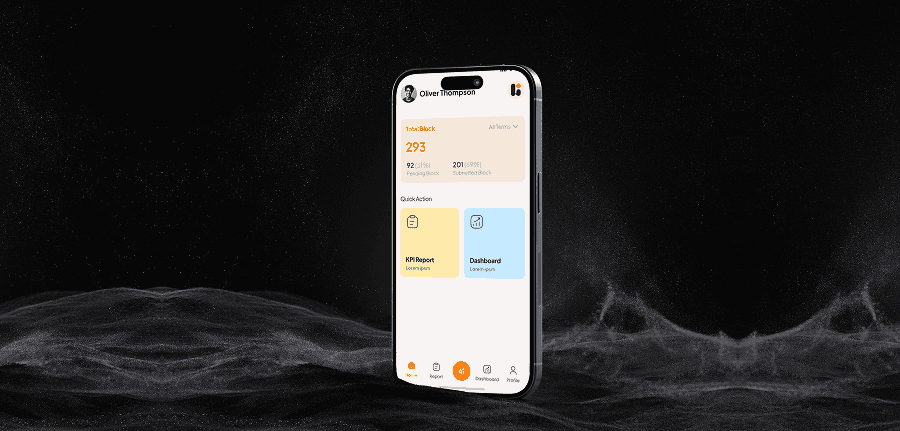
Designing mobile dashboards for high-level KPI overview
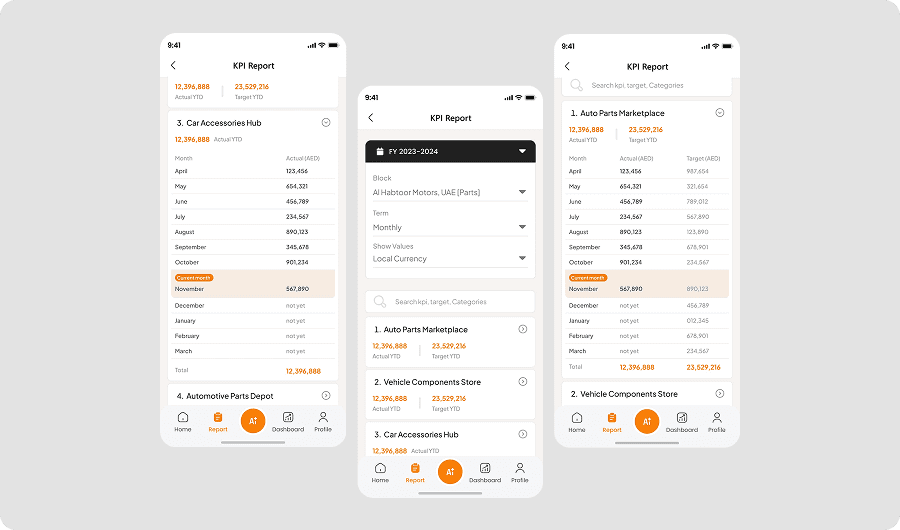
Designing mobile KPI report screens from large web datasets
Translating complex tables into easy-to-scan mobile layouts
Structuring distributor and dealer comparisons for mobile
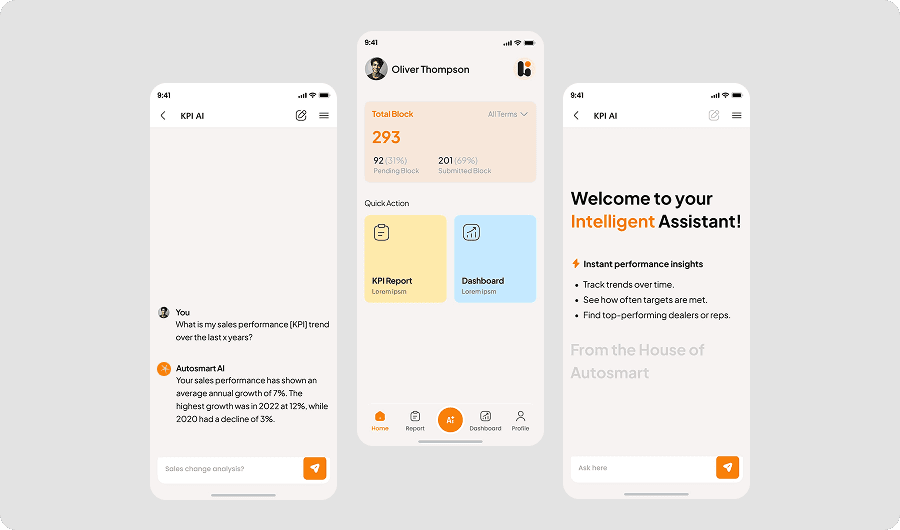
Designing an AI chat interface to surface insights from KPI data
Ensuring usability, clarity, and hierarchy across all mobile screens
Process
I analyzed existing web dashboards and reports to understand:
which KPIs mattered most to leadership
what data could be summarized
what needed comparison vs detail
what could be progressively revealed
Instead of shrinking the web UI, I restructured the information architecture specifically for mobile.
I designed mobile dashboards that:
summarize key KPIs at the top
highlight trends and performance gaps
show distributor and dealer rankings clearly
reduce information overload
support quick decision-making
The dashboard was designed to deliver clarity within seconds, not minutes.
For reports, I focused on ease of understanding:
redesigned large web tables into mobile-friendly structures
grouped related KPIs
introduced visual hierarchy for scanning
minimized horizontal scrolling
enabled easy comparison across dealers and distributors
This allowed users to review performance comfortably on mobile, even with complex data.
To further simplify understanding, I designed an AI chat experience that allows users to:
ask questions about KPI performance
get summarized insights from system data
understand trends without manually scanning reports
This helped users move faster from
data → insight → decision.
5. User-Centric, Simple UI
Despite handling enterprise-level data, the mobile UI was intentionally:
clean and minimal
highly readable
structured around user intent
optimized for leadership and management users
The design focused on usability over visual noise.
Outcome & Impact
The mobile redesign delivered strong improvements:
Dedicated mobile dashboard and report experience launched
Large web data successfully translated into mobile-friendly views
Faster understanding of KPI performance
Reduced cognitive load during reviews
Improved usability for leadership on the go
Positive feedback from enterprise users
Increased confidence in using KPI Hub on mobile
The product became practical, usable, and effective for real-world executive workflows.
Reflection
This project reinforced a key product design principle:
responsive design is not enough — data must be re-designed for context.
By converting dense web dashboards and reports into a mobile-first, user-centric experience, I helped make complex KPI data easy to understand and act upon.
This work strengthened my ability to design data-heavy enterprise products that remain simple, human, and impactful.
Design Screens